
Your products. Your rules. Your configurator.
Build the exact configurator your industry needs. In IC Extra, you define the steps, parameters, business rules, pricing, and drawing. Sales reps choose the variants, and the system guides them to a complete product.
Up to 800 mm wide: no divider.
Change parameters and see the dependencies. Demo model and prices.
The product defines the rules.
Each product family can have its own configurator. Define the steps, group parameters, and choose how options appear: lists, numbers, colors, or images.
From a single custom-size component to a complex assembly. Add products and develop configurators in one system instead of building a separate application each time.
Arrange the steps
Choose parameters
Connect the rules
Your conditions and calculations
Field available according to your rule
Your product expertise. In every selection.
The advanced rules engine connects product parameters with manufacturing and business logic. It selects available options, sets values, calculates dependent dimensions, and updates prices. Sales reps draw on manufacturer expertise without memorizing every exception.
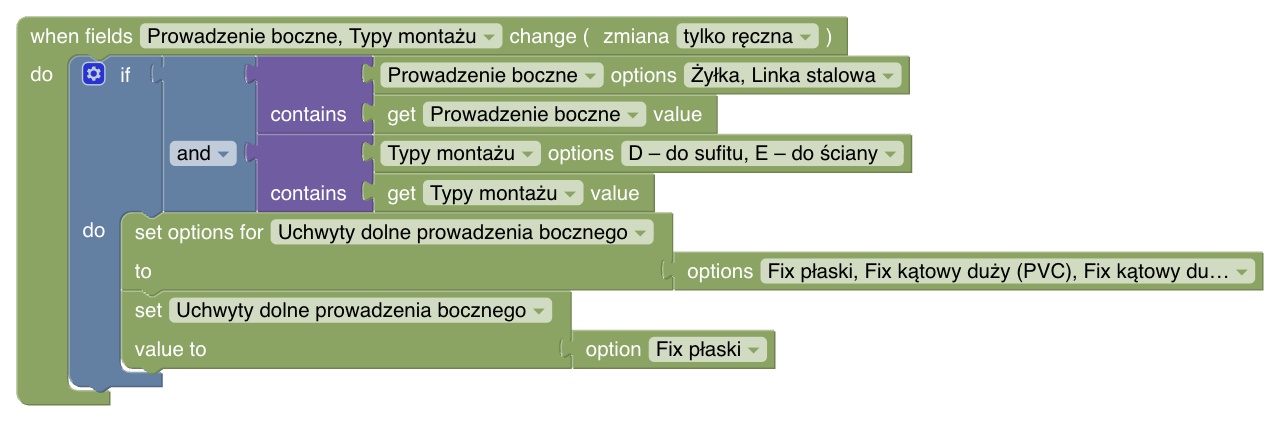
Define simple dependencies as conditions and actions. Build more complex scenarios in the visual rule editor by combining calculations, conditions, and table data.
For example, link side guiding to the mounting method. A rule makes compatible brackets available and automatically selects a default.
Fewer mistakes. Before an order is placed.
The configurator enforces permitted ranges and option dependencies. It provides hints and warnings; blocking errors prevent adding an invalid product to a quote. Salespeople immediately know what to fix.
- Dimension ranges
- Variant compatibility
- Required parameters
- Manufacturing constraints
- Component dependencies
Design one drawing for multiple variants.
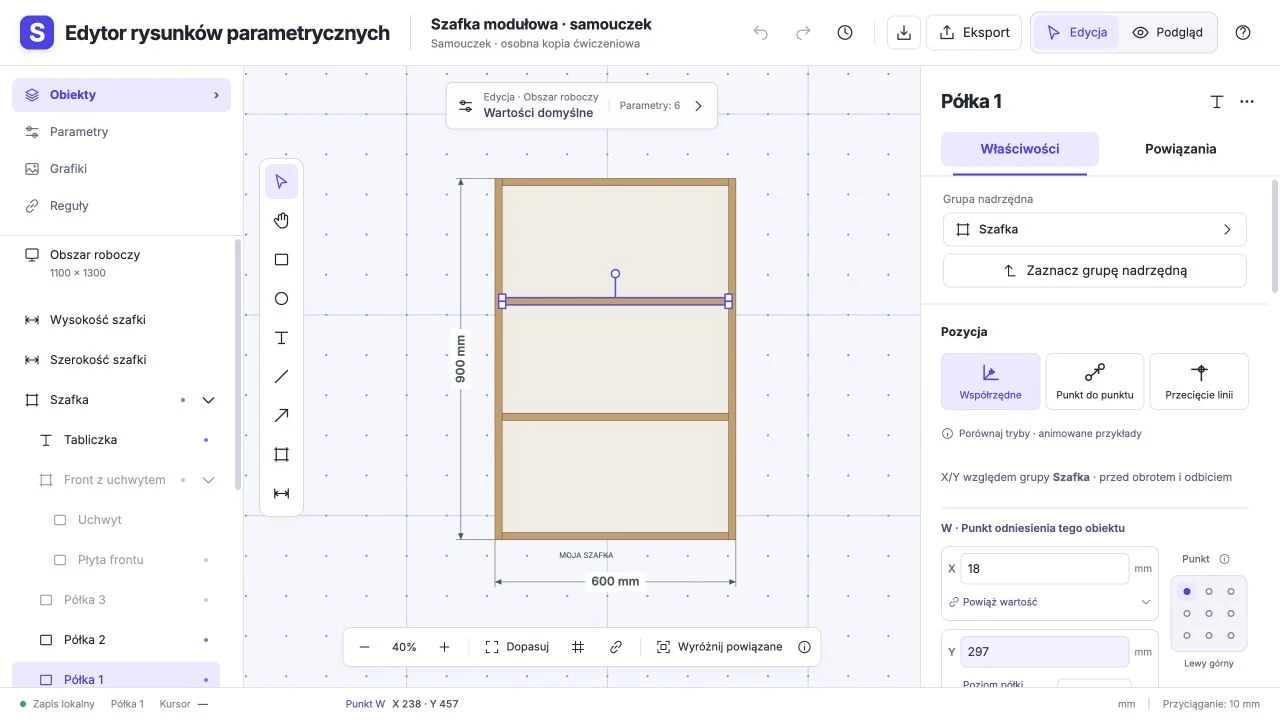
The new drawing template editor lets you create your own product visuals with shapes, lines, text, images, and dimensions. Arrange elements on the canvas, group them, and link them to configurator parameters.
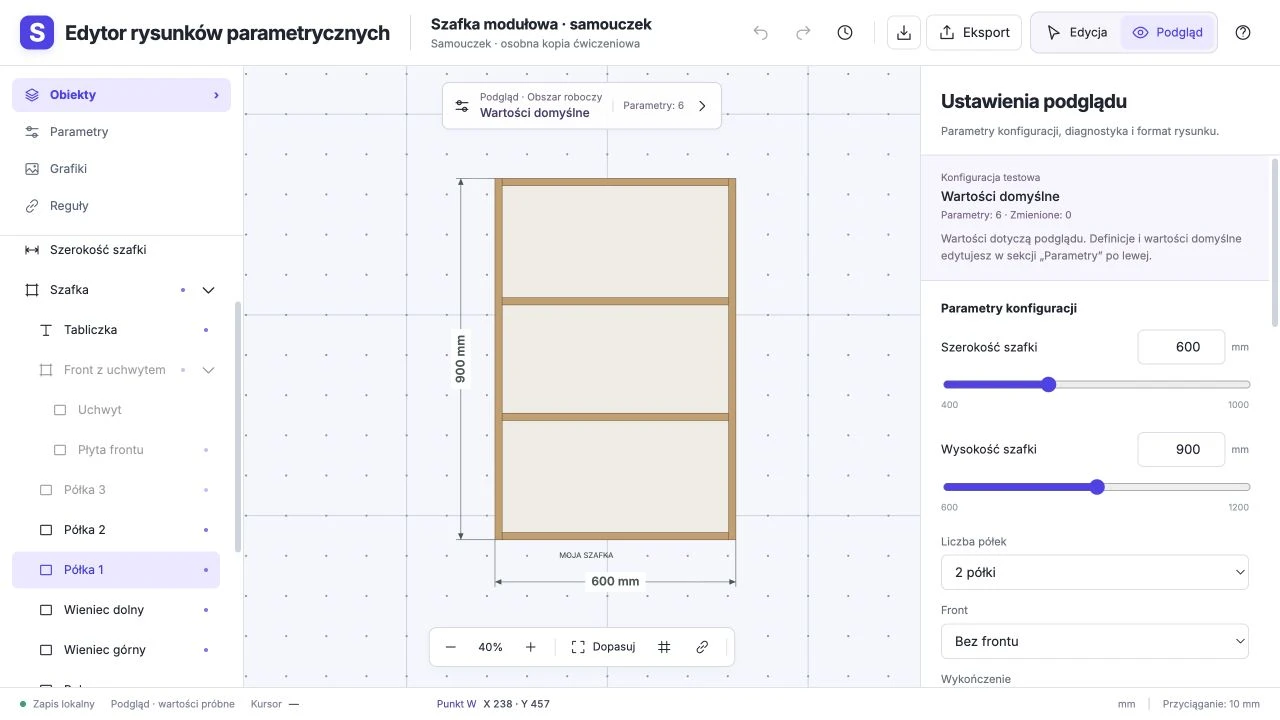
Width, position, color, or visibility can follow customer choices. One template covers many sizes and variants—the drawing changes with the product.
Complex pricing. A simple choice for customers.
Combine option price lists, dimension tables, and custom calculations. Include materials, size, quantities, and surcharges. Pricing updates with configuration, making comparisons and quoting easier.
Commercial terms and currencies are handled by the shared IC COMPLEX engine. The same product model can serve different customers with pricing appropriate to each.
| Price component | Before tax |
|---|---|
| Custom-size cabinet carcassWidth-based pricing | 640 PLN |
| Shelves3 × 80 PLN | 240 PLN |
| DividerAdded by rule above 800 mm | 120 PLN |
| Total before tax | 1 000 PLN |
Sample pricing for the demonstration above.
Import attributes. Build a configurator.
Import product attributes and their options from your ERP—for example, fabrics and available variants, or control types. Use this data to build selection fields in your configurator without entering every value again.
Choose the attributes, organize them into steps, and define dependencies between options. Connect them to your rules, drawings, and pricing. Data comes from ERP; you decide how the configurator works.
Sample data for interior shades and blinds.
One platform. Any industry.
Build configurators for your own roller shades, pleated shades, and blinds. Define fabrics, colors, dimensions, mounting, and controls. Set option dependencies, design drawings, and define pricing rules.
Adding a fabric collection, updating prices, or expanding your range? Update the configurator yourself. Use the same tools to build configurators for custom furniture, equipment, and products in other industries.
Start with your product.
Bring your catalog, pricing, and option dependencies into IC Extra. You decide how the configurator works. Our demo shows the tools for building it yourself.
Can we build a configurator for another industry?
Yes. Build configurators for any industry in IC Extra: define parameters, steps, rules, drawings, and pricing. We can support unusual technical and integration requirements.
Can each product have different fields and steps?
Yes. Configurators can have their own steps, field groups, units, variants, and dependencies. Available fields and options can change with earlier selections.
How complex can the rules be?
From a simple condition that reveals an option to multistep calculations, variant filtering, value setting, messages, and surcharges. Build rules in simple mode or in the visual rule editor.
Can manufacturers develop configurators themselves?
Yes. Manufacturers build and maintain configurators: steps, parameters, rules, and pricing in IC ADMIN; custom templates in the drawing editor. Training and support are available for complex logic and integrations.
Do we need to draw every product variant?
No. The template links drawing elements to parameters and rules. Dimension or option changes update geometry, labels, and element visibility according to the defined dependencies.
Can we test a template before publishing it?
Yes. The new editor includes parameter previews, saved test configurations, and diagnostic tools. Check dimensions and variants and inspect the drawing in the configurator, thumbnail, and print output.
What data can be imported?
Imports can include configurator data such as product attributes, options, and price lists. Scope depends on the source and mapping. During implementation, we also define which data is managed in ERP and which in IC ADMIN.
Does integration require us to replace our ERP?
We start with your current system’s data exchange capabilities—APIs and files—to define mappings and synchronization directions. Any ERP-side work depends on its interfaces and the required data.
How long does configurator implementation take?
It depends on product count, rule and drawing complexity, data readiness, and integration scope. You can start with one product family and expand the configurator yourself in stages. If needed, we help prepare the initial launch and integration.
Build your own product configurator.
Define parameters, build rules, design drawings, and set pricing yourself. IC Extra gives you the tools to create and grow your configurators.
